Evolving MLOps: Automated Model Retraining Pipelines with Feature Stores
Securing data consistency between offline training datasets and online production features.

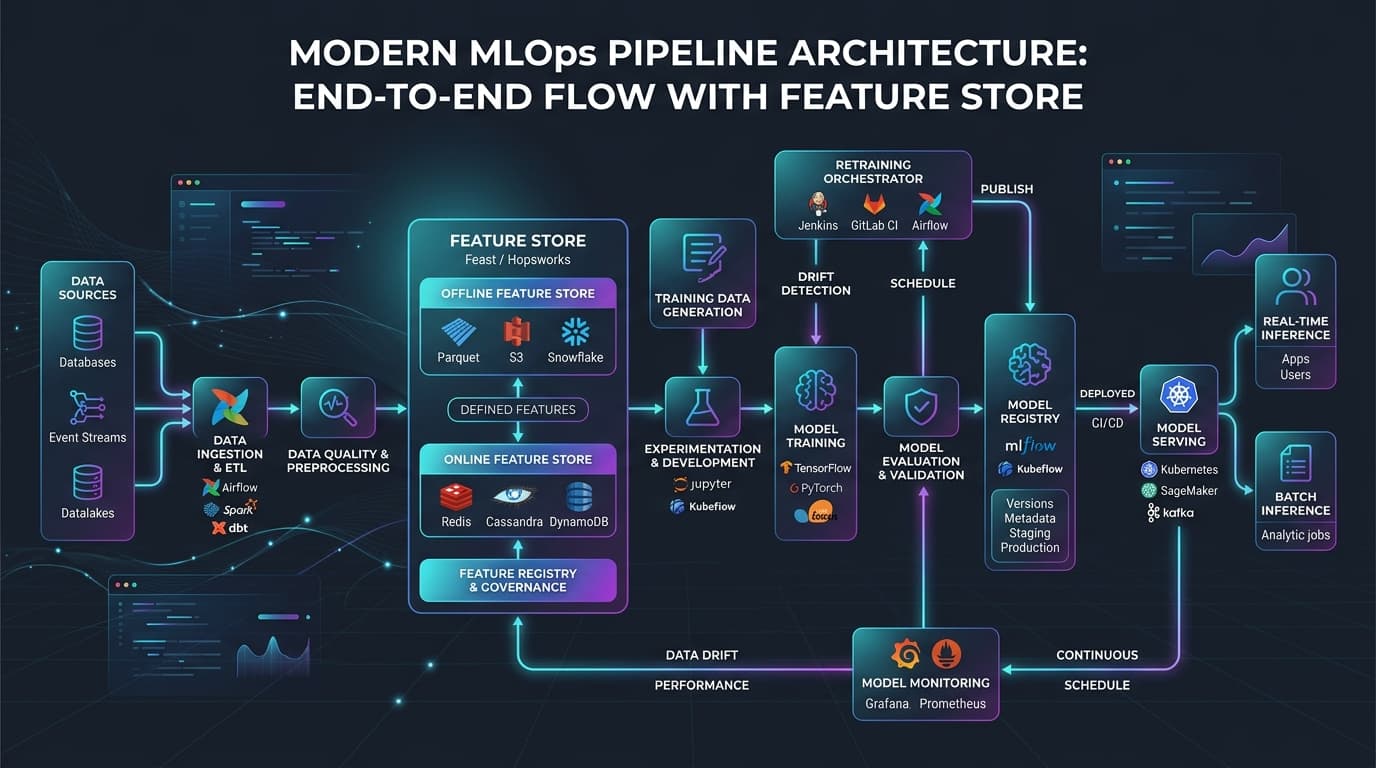
In modern production machine learning systems, data is dynamic. Customer behaviors shift, macroeconomic conditions fluctuate, and the statistical properties of real-world features evolve. Consequently, machine learning models that perform exceptionally well in offline evaluation gradually degrade when exposed to live production traffic. This performance degradation—driven by data drift and concept drift—requires automated model retraining pipelines.
However, automating model retraining is not merely a scheduling problem. The primary challenge in automated retraining is maintaining absolute feature consistency. If the feature engineering logic used to train the retrained model differs by even a single parameter from the logic used to calculate features for live online inference, the model will experience training-serving skew. This mismatch is a silent killer of production AI systems, causing models to make confident but highly inaccurate predictions without triggering traditional application exceptions.
To solve this challenge, modern MLOps architectures position the Feature Store as the centralized source of truth, backed by a version-controlled Feast Feature Registry. By decoupling feature engineering from model code and serving environments, feature stores ensure that training datasets and production feature vectors are derived from identical definitions.
What Is It?
At its core, an automated model retraining pipeline with a feature store is a closed-loop system designed to detect model degradation, query point-in-time correct historical features to train a new model candidate, validate the new candidate, and deploy it to production—all while ensuring consistent feature transformations across both offline training and online serving.
In this architecture, the Feature Store is divided into two logical storage layers linked by a unified feature registry:
- Offline Store: A historical data archive optimized for high-throughput batch queries. It is used to generate training datasets via point-in-time (ASOF) joins, preventing look-ahead bias and data leakage (for details on ASOF mechanics, see the Feast Point-in-Time Joins Guide). Typical backends include BigQuery, Snowflake, Apache Iceberg, or parquet files stored in AWS S3 or Google Cloud Storage.
- Online Store: A low-latency database optimized for single-row key-value lookups. It is used during live inference to enrich incoming requests with pre-computed features in real time. Typical backends include Redis, DynamoDB, or Apache Cassandra.
The retraining pipeline is an orchestrator-driven workflow (using tools like Apache Airflow, Prefect, or Kubeflow Pipelines) that interacts with this dual-store database, leveraging unified feature schemas defined in a central registry.
Why It Matters
Implementing automated retraining pipelines with feature stores solves three of the most critical failure modes in MLOps:
1. Eliminating Training-Serving Skew
Without a feature store, developers typically write two separate pipelines: a SQL-based batch pipeline to extract historical data for training, and a Python or Go-based microservice pipeline to calculate features on-the-fly for real-time predictions. Over time, these two codebases diverge. A change in a window function, a different handling of missing values, or a slight variation in time-zone conversion creates a subtle statistical mismatch. According to the MLOps Community 2026 Production ML Survey, over 70% of silent production failures in machine learning deployments are directly caused by this training-serving skew.
2. Preventing Data Leakage via Point-in-Time Correctness
When generating a historical dataset to retrain a model, it is easy to accidentally leak future information into the training features. For example, if a customer makes a purchase on June 15, their "number of transactions in the last 30 days" feature must be calculated exactly as it stood on June 15 at the millisecond of the transaction—not including the transaction itself or any transactions that occurred on June 16. A feature store automates this temporal calculation through point-in-time (ASOF) joins, guaranteeing that the model is trained only on information that was historically available.
3. Scaling Custom Fine-Tuning and Hybrid AI Architectures
As teams shift from static tabular models to dynamic AI agents and LLM-based architectures, real-time feature consistency becomes even more vital. For enterprise applications deploying PEFT/LoRA fine-tuning for enterprise domains, feature stores provide the structured context vectors required to refine specialized model weights. Furthermore, hybrid search patterns that merge tabular data with structured embeddings require a unified store to retrieve high-dimensional vectors and low-dimensional customer history in a single, low-latency call.
How It Works
The automated retraining lifecycle operates as a feedback loop. The following step-by-step breakdown illustrates how data flows between the feature store, the retraining runner, and the production inference service:
Step 1: Feature Definition and Registration
Data engineers define features declaratively in a configuration file (e.g., using python definitions in Feast or SQL assertions in Tecton; see Tecton Feature Definition Docs). These definitions are registered in the Feature Store registry. The registry acts as the schema authority.
Step 2: Continuous Feature Ingestion
Data pipelines continuously ingest raw data from streaming sources (like Apache Kafka or AWS Kinesis) and batch sources (like data warehouses) into the feature store, following standard Feast Feature Ingestion Docs patterns. * The Online Store is updated in real time with the latest feature values.
- The Offline Store appends these events to preserve a complete historical record.
Step 3: Triggering the Retraining Pipeline
Retraining can be initiated by three distinct triggers:
- Schedule-based: Running on a cron schedule (e.g., every Monday at 02:00 UTC).
- Drift-based: Triggered when a drift detection service detects that the statistical distribution of live inference features has shifted significantly from the training distribution.
- Performance-based: Triggered when the model's accuracy or F1-score drops below a critical threshold on ground-truth labels.
Step 4: Point-in-Time Historical Retrieval
When triggered, the retraining engine queries the offline store. It passes an entity dataframe containing entity keys and historical timestamps (e.g., a list of transaction IDs and their exact transaction times). The offline store performs a temporal join to return the exact feature values as they existed at those precise historical timestamps.
Step 5: Model Training and Verification
The pipeline trains a new model candidate using the retrieved dataset. Before promotion, the model candidate undergoes rigorous validation gates. Just as teams must implement LLM validation gates in production to block hallucinations, MLOps engineers run automated statistical tests to verify that the retrained model performs significantly better than the active production model without introducing regression bugs.
Step 6: Deploying the Model
The validated model is compiled and registered in the Model Registry. The production inference service pulls the new model. During inference, when a prediction request arrives containing an entity ID (e.g., user_id: 99482), the inference service fetches the pre-computed feature values from the online store in real time, guaranteeing that the feature values match the format the model was trained on.
Architecture
A resilient automated model retraining architecture requires a clear separation of compute and storage. The system must ingest raw telemetry, store historical and real-time states, orchestrate execution steps, and serve predictions with minimal latency.
The following Mermaid diagram visualizes the flow of data and control signals across the architecture:
graph TD
    A[Raw Data Sources: Kafka/BigQuery] -->|Ingestion Pipelines| B(Feature Store Registry)
    B --> C[Offline Store: Apache Iceberg / Snowflake]
    B --> D[Online Store: Redis / DynamoDB]

    E[Production Inference App] -->|1. Log Requests| F[Inference Logs DB]
    E -->|2. Get Real-Time Features| D

    G[Drift & Monitoring Monitor] -->|Read Logs & Baselines| F
    G -->|3. Trigger Drift Alert| H[Orchestrator: Apache Airflow]

    H -->|4. Request Historic Join| C
    C -->|5. Return Training Data| H
    H -->|6. Retrain Model| I[Training Engine: PyTorch/XGBoost]
    I -->|7. Model Artifact| J[Model Registry]

    J -->|8. Validate Candidate| K{Validation Gates}
    K -->|Pass| L[Production Deployment System]
    L -->|9. Update Model| E
    K -->|Fail| M[Slack / PagerDuty Alert]
To implement this architecture, MLOps engineers must choose the right tools. The table below compares the leading enterprise and open-source feature platforms as of mid-2026:
Table 1: Feature Store Platforms Comparison (2026 Edition)
| Feature / Metric | Feast v0.64.0 | Tecton v0.9.3 | Hopsworks v4.1 |
|---|---|---|---|
| Primary Philosophy | Open-source, orchestrator-agnostic | Managed enterprise SaaS | Integrated AI Lakehouse platform |
| Compute Engines | Local Python, Spark, dbt | Spark, Python-native (Rift Engine) | Spark, Flink, RonDB compute |
| Online Storage Backends | Redis (v8.0), DynamoDB, MongoDB | Redis (v8.0), DynamoDB | RonDB (High-availability MySQL cluster) |
| Offline Storage Backends | BigQuery, Snowflake, Redshift, S3 | Snowflake, BigQuery, Spark Parquet | Apache Iceberg, Delta Lake |
| Vector Search Support | Experimental index mapping | Native semantic/vector features | First-class vector database support |
| Ingestion Pipeline | User-managed (Airflow/Prefect) | Fully managed streaming/batch | In-platform Flink streaming |
| Point-in-Time Joins | Client-side SDK execution | Cloud data warehouse pushing | Native Spark/SQL execution |
In addition to choosing the platform, understanding the differences between the online and offline storage layers is essential for tuning ingestion frequencies and query optimization:
Table 2: Offline Store vs. Online Store Characteristics
| Property | Offline Store | Online Store |
|---|---|---|
| Primary Use Case | Model retraining, batch scoring, feature exploration | Low-latency real-time inference serving |
| Target Latency (p99) | Minutes to hours (batch query size dependent) | <2ms (single-row lookup) |
| Query Throughput | Millions of rows per batch query | Thousands of requests per second (RPS) |
| Storage Engine | Columnar formats (Parquet, ORC, BigQuery, Snowflake) | Key-value/Document (Redis v8.0, DynamoDB, Cassandra) |
| Primary Join Mechanism | Temporal/ASOF joins using entity event timestamps | Key-value point lookups (instantaneous slice) |
| Data History | Complete historical timeline (infinite retention) | Latest state per entity key (overwritten on update) |
Production Deployment Considerations
Deploying an automated model retraining pipeline with a feature store into a production environment requires addressing real-world network, storage, and latency constraints.
1. Ingestion Performance and Database Choices
For real-time applications (such as fraud detection or dynamic pricing), the online store must return features in less than 5 milliseconds. Redis v8.0 (released in 2026) is the industry standard for caching these feature vectors due to its in-memory data structures and sub-2ms lookup latency. When writing feature definitions, avoid wide entity records. Fetching a feature vector with 500 features can cause network bottlenecks. Group features into smaller, specialized feature views.
For large-scale offline stores, use modern open table formats such as Apache Iceberg or Delta Lake. These formats support time-travel queries, enabling the retraining orchestrator to retrieve data precisely as it existed on any historical date.
2. Implementing Point-in-Time ASOF Joins in Apache Spark
The mathematical model for point-in-time joins involves joining an entity event dataframe E containing keys and timestamps t_e with a feature table F containing keys and update timestamps t_f. The join must satisfy:
t_f <= t_e
And for any alternative update t_f', the joined row must maximize t_f such that:
t_f = max(t_f') subject to t_f' <= t_e
This prevents future data leakage into the training set. In Apache Spark 3.5+, this can be executed efficiently using the ASOF JOIN syntax. The code snippet below demonstrates how to perform a point-in-time join using PySpark and Feast v0.64.0:
from feast import FeatureStore
import pandas as pd

# Initialize the Feature Store using the local repository configuration
store = FeatureStore(repo_path="./feature_store")

# Define the entity dataframe representing the events we want to train on.
# Each transaction has an entity key (user_id) and a timestamp (event_timestamp).
entity_df = pd.DataFrame(
    {
        "user_id": [10001, 10002, 10003],
        "event_timestamp": [
            pd.Timestamp("2026-06-01 10:14:00", tz="UTC"),
            pd.Timestamp("2026-06-02 11:22:30", tz="UTC"),
            pd.Timestamp("2026-06-03 14:05:15", tz="UTC")
        ],
        "label": [1, 0, 1]  # Target variable (e.g., fraud or not fraud)
    }
)

# Fetch historical features with point-in-time correctness
training_data = store.get_historical_features(
    entity_df=entity_df,
    features=[
        "user_transaction_stats:transaction_count_30d",
        "user_transaction_stats:total_spend_30d",
        "user_profile:credit_score"
    ]
).to_df()

# Print the resulting training dataset
print("Point-in-time correct training dataset:")
print(training_data.head())
Common Mistakes
Many teams fail in their feature store and retraining implementations because they fall into common design traps:
1. Hardcoding Features in both Python and SQL
The absolute worst pattern is defining feature transformations in two different files: a Spark SQL query for training datasets and a Python Pandas block inside the API microservice. This guarantees training-serving skew. Transformations must be defined once in the feature store registry (e.g., using a declarative feature view config) and run on a single execution framework (like Spark or Rift).
2. Time-Zone Mismatches in Joins
If your offline warehouse stores timestamps in UTC, but your entity event dataframe logs timestamps in local server time (e.g., EST or PST), your point-in-time joins will align incorrectly. This will lead to data leakage (fetching future features) or historical starvation (fetching features from the wrong day). Always enforce strict timezone-aware UTC timestamps across all systems.
3. Starving the Online Store
Ingesting data into the online store too slowly causes real-time predictions to be made on stale features. For example, if a user's transaction limit is updated, but the online store update is delayed by 10 minutes, the fraud model will evaluate transaction attempts using outdated balance statistics, leading to unauthorized withdrawals. Use high-throughput streaming systems (Flink/Kafka) to keep online feature latency low.
Lessons From Production Deployments
Based on large-scale MLOps deployments in 2026, engineering teams have documented critical operational lessons:
Lesson 1: Out-of-Order Data Ingestion
In real-world networks, features do not arrive in chronological order. A mobile client might go offline and upload its transaction logs 3 hours late. If the feature store does not support retroactively updating historical feature tables, the offline store will contain gaps, and subsequent retraining runs will be trained on incomplete histories. Teams must build pipelines that allow backfilling and historical updates with automatic partition validation.
Lesson 2: Handling Schema Evolution
As business requirements change, features change. A feature that once returned an integer might now return a float, or a new categorical value might be introduced. If the retraining pipeline blindly fetches historical features using an updated schema, older models in the registry might crash during backtesting. Production systems must implement versioned feature views (e.g., user_stats_v1 and user_stats_v2) to ensure backward compatibility.
Lesson 3: The Danger of Cascading Retraining Loops
In fully automated setups, a model degradation alert triggers retraining. The new model is trained and deployed. However, if the drift was caused by a fundamental structural shift in the external world (e.g., a sudden regulatory change), the retrained model will also degrade quickly, triggering another retraining run. If unchecked, this creates an infinite loop of training cycles, consuming massive cloud compute resources and degrading performance further. Automated pipelines must incorporate rate-limiting gates (e.g., maximum 1 retraining run per 24 hours) and alert human engineers if performance does not stabilize after retraining.
What Most Articles Miss
Most MLOps articles discuss feature stores as simple databases and retraining as cron jobs. They ignore the complex interaction of feature drift metrics with downstream model performance degradation.
When features drift, the relationship between the inputs and the targets change. A common mistake is retraining the model immediately on any minor statistical drift. However, some drift is benign (e.g., a temporary seasonal variation in transaction volumes during Black Friday) and does not degrade model performance. Retraining on benign drift can cause the model to overfit to temporary anomalies, degrading its long-term generalization.
To address this, high-maturity architectures implement a Two-Tier Validation Gate. Before triggering a retraining run, the monitoring service must calculate both the feature distribution drift and the concept drift.
Table 3: Drift Detection Metrics and Retraining Gates
| Metric Type | Statistical Method | Calculation Target | Warning Action | Critical Retraining Trigger |
|---|---|---|---|---|
| Feature Drift | Population Stability Index (PSI) | Distribution of a single feature over time | Log metric, trigger warning alert if PSI > 0.1 | Run automated retraining if PSI > 0.2 for key features |
| Numerical Drift | Kolmogorov-Smirnov (KS) Test | Continuous numerical features | Flag feature in registry if p-value < 0.05 | None (requires correlation validation) |
| Categorical Drift | Chi-Square Test | Distribution of categorical feature classes | Flag feature if p-value < 0.01 | None (requires correlation validation) |
| Concept Drift | F1-Score / Precision / Recall | Model prediction error on ground truth labels | Alert on-call engineer if metrics drop by 2% | Auto-trigger retraining if performance drops by >5% |
Rather than triggering retraining on feature drift alone, the system should compute the correlation between the drifted feature and the model's error rate. If the feature drift does not correlate with a drop in prediction accuracy, the orchestrator should delay retraining, avoiding redundant compute cycles.
Best Practices
To build a reliable automated retraining pipeline with a feature store, adhere to the following architectural guidelines:
- Write Declarative Feature Definitions: Maintain all feature configurations in Git. Treat features as code. Peer review all changes before running CI/CD deployments to production registries.
- Perform Byte-for-Byte Validation Checks: Run regular shadow validation tests where you query a feature value from the online store and compare it to the same feature value calculated by the offline store for the same millisecond. If there is any difference, abort deployment and investigate the transformation logic.
- Decouple the Orchestrator from the Compute Engine: Let Airflow or Prefect handle the task dependency graph, but offload the actual data transformations to Spark, Snowflake, or the Feature Store's native compute engine (like Tecton's Rift engine). This keeps orchestrator worker nodes lightweight and prevents memory starvation.
- Implement Shadow Deployments: When a new model is trained, do not deploy it directly to live traffic. Run it in shadow mode alongside the active model. Compare the predictions of both models on identical online feature inputs retrieved from the online store, verifying performance before route promotion. To evaluate performance accurately, apply retrieval metrics evaluation methods to check consistency.
- Optimize Online Store Indexes: Since the online store requires sub-2ms lookups, optimize your database indexing. If you are serving search or agentic queries that require similarity comparisons, configure vector databases indexing strategies such as HNSW or IVF-PQ to maintain low latency. If you use hybrid queries, ensure your lookup pipelines merge tabular keys with vector indexes using efficient hybrid search patterns.
FAQ
1. What is the main difference between a feature store and a standard data warehouse?
A data warehouse is optimized for analytical query workloads across historical data. A feature store extends this capability by providing a unified schema registry, a dual-store architecture (offline batch and low-latency online serving), and native point-in-time join mechanisms to prevent data leakage during machine learning training.
2. How does point-in-time correctness prevent data leakage?
Data leakage occurs when future information is included in a training dataset. Point-in-time joins ensure that for any historical training event, the joined features are calculated using only data that was recorded before the event's timestamp, mirroring what the model would actually see during live inference.
3. What is training-serving skew, and how does a feature store eliminate it?
Training-serving skew is the difference in feature values or transformation logic between model training (offline) and prediction serving (online). A feature store eliminates this skew by using a single, declarative definition file for each feature, ensuring that the same code compiles into both batch transformations (offline) and real-time transformations (online).
4. What are the best databases for the online feature store?
Redis is the industry standard for online serving due to its low latency and high throughput. Other common choices include AWS DynamoDB, GCP Bigtable, and Apache Cassandra (or ScyllaDB) for high-scale, multi-region deployments.
5. When should I use drift-based retraining instead of schedule-based retraining?
Schedule-based retraining is best when ground-truth labels arrive on a predictable cadence (e.g., credit defaults recorded monthly). Drift-based retraining is necessary for high-frequency applications (like ad click-through rate modeling or stock trading) where sudden external shifts can degrade model performance overnight.
6. What is the Population Stability Index (PSI) and how is it used?
PSI is a metric that measures how much a variable's distribution has shifted between two points in time (e.g., training distribution vs. production inference distribution). A PSI < 0.1 indicates no significant shift, a PSI between 0.1 and 0.2 indicates a moderate shift, and a PSI > 0.2 indicates a severe shift, which is commonly used to trigger automated model retraining.
7. Can I build a feature store myself using Postgres or standard SQL databases?
Yes, for small-scale applications, you can build a lightweight feature store using a database like PostgreSQL. By defining tables for offline records and online caches, and writing custom temporal join queries, you can achieve basic feature store capabilities. However, as scale increases, managing streaming ingestion, API latency, and lineage tracking makes specialized tools like Feast or Hopsworks more cost-effective.
8. Does automated retraining always require a human-in-the-loop?
No, but it is highly recommended to have automated validation gates. While the retraining process can run entirely without human intervention, the final promotion step should require automated approval (e.g., verifying that the new candidate's accuracy is higher than the current model's accuracy by a specific threshold) and generate alerts for review if validation fails.
9. How do feature stores support high-dimensional embeddings for LLMs and GenAI?
Modern feature stores (like Hopsworks v4.1 or Feast v0.64.0, following the Feast 2026 AI Roadmap) support vector features. They allow you to store and serve high-dimensional vector embeddings alongside traditional tabular data, enabling real-time retrieval for retrieval-augmented generation (RAG) and recommendation search queries.
10. How does data backfilling work in feature store architectures?
When you define a new feature, you must populate its historic values in the offline store so that existing models can be retrained with the new feature. This process is called backfilling. The feature store reads historical raw logs from your data warehouse, executes the feature transformation logic, and writes the output back into the offline store partitions.
Key Takeaways
- Centralized Source of Truth: A feature store provides a unified registry that defines features once, eliminating training-serving skew by using identical definitions for offline training and online serving.
- Point-in-Time Correctness: Temporal (ASOF) joins in the offline store prevent future data leakage during retraining dataset generation, ensuring model reproducibility.
- Sub-2ms Online Latency: A Redis-backed online feature store retrieves feature vectors in
<2msp99, enabling high-throughput inference services to enrich incoming queries instantly. - Automated Drift & Concept Gates: Retraining pipelines should be triggered by metrics like the Population Stability Index (PSI) and model F1-score degradation, validated through two-tier evaluation gates before promotion.
- Declarative Configurations: Managing features as code in Git ensures schema evolution control, preventing silent compilation crashes in production pipelines.